A single small site, rarely changed
If one comms cupboard never changes, a well-kept spreadsheet may be enough. Once several technicians, sites or clients are involved, versions drift and nobody trusts the file.
COMPARE CABVIX
Spreadsheets, MSP documentation platforms, network source-of-truth tools and cable-management suites all record parts of a network. This page shows where CABVIX fits, where another kind of tool is the better choice, and how they work together.
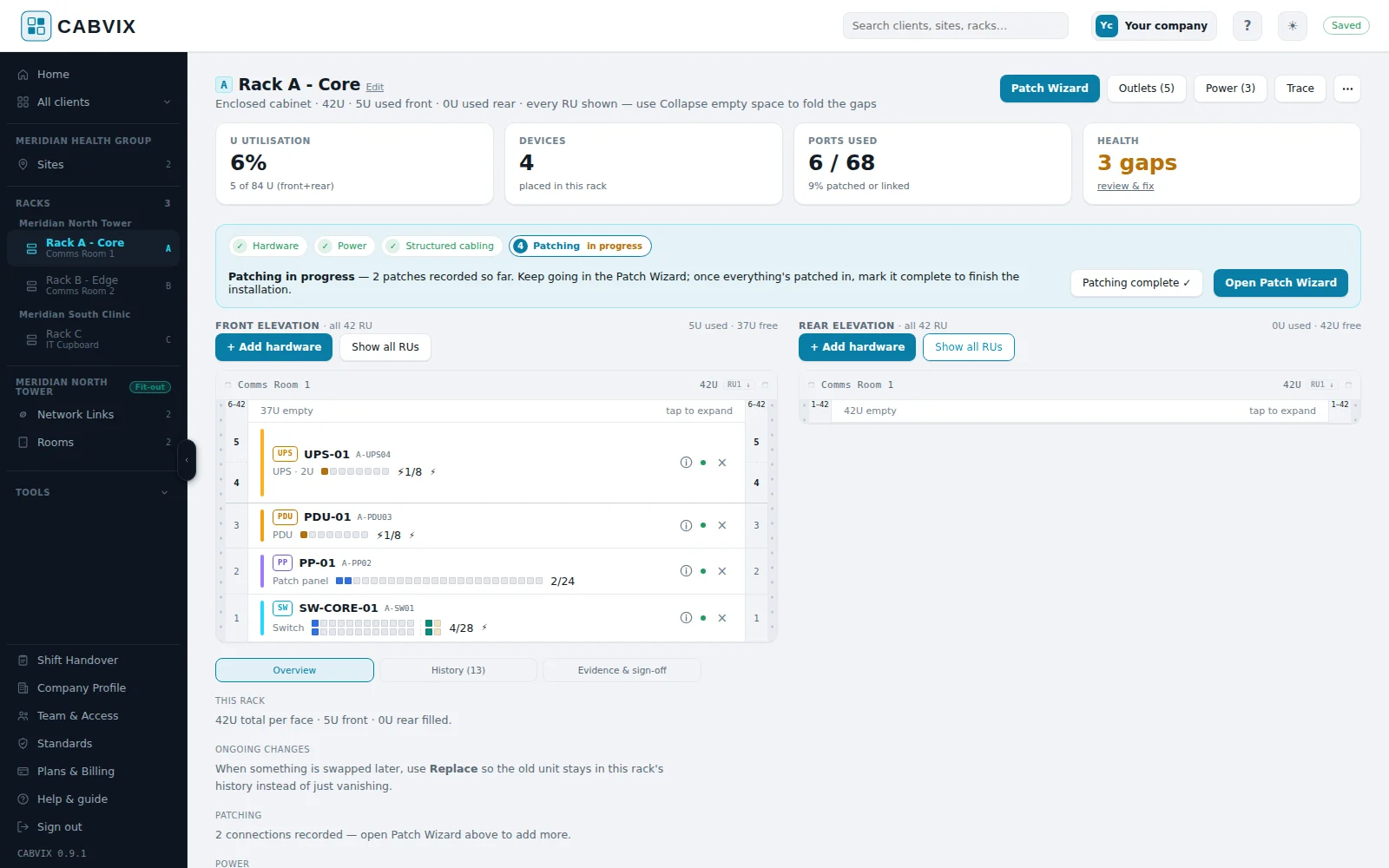
CABVIX is for the teams who stand in front of the cabinet: MSPs, installers, integrators and auditors. It captures racks, patching, outlets, power and links on site and turns them into a client-ready record. It doesn’t replace a password vault, a general MSP knowledge base or an IP address management tool. It sits beside them.
SIDE BY SIDE
| Capability | CABVIXPhysical-layer field workspace | Spreadsheets & diagramsGeneral-purpose files | MSP documentation platformsIT knowledge bases | Network source-of-truth toolsLogical network models | Cable & infrastructure suitesEnterprise and data-centre |
|---|---|---|---|---|---|
| Field capture | |||||
| Built for capture while standing at the cabinet | ✓Every screen fits a phone, with Fit-out and Survey site modes and tone-out outlet mapping | ◐Possible, but awkward on a phone | ◐Web-based; general IT records | ◐Usually aimed at engineers at a desk | ◐Varies by product |
| Set up without designing a data model first | ✓Client → site → room → rack, with sample data and help videos | ◐A blank file; each team invents a layout | ✓Templates and flexible records | —The data model needs planning first | ◐Configured for your estate |
| Racks & connections | |||||
| Front and rear rack elevations | ✓Front and rear, drag-and-drop from an 85-model catalogue | ◐Drawn by hand; drift out of date | ◐Varies by platform | ✓Usually native | ✓Usually native |
| Switch → patch panel → outlet mapping | ✓Structured cabling builder, Patch Wizard, lead colours and rogue cables | ◐Manual rows per port | —Not a core focus | ✓Usually modelled | ✓Core capability |
| Power chain: wall → UPS → PDU → device | ✓Mains, UPS and PDU feeds to each device, including dual supplies | ◐Manual | —Not a core focus | ✓Usually modelled | ◐Depth varies |
| Outlet-to-switch trace | ✓Trace any outlet hop by hop, with lead colours | —Not without formulas or guesswork | —Not a core focus | ✓Usually available | ✓Usually available |
| Failure impact before you touch anything | ✓Blast Radius: devices, racks, links or mains, in three layers (Pro) | —Not practical | —Not a core focus | ◐Possible with custom work | ◐Varies by product |
| Floor-plan placement of racks and outlets | ✓Site plan with racks, outlets and landmarks | ◐A separate drawing | ◐Plans attached as files | ◐Often via add-ons | ◐Varies by deployment |
| Handover | |||||
| QR stickers that open the live record | ✓Rack, equipment and outlet stickers; your team opens the record, others request access | —Static printouts only | ◐Varies | ◐Often via add-ons | ◐Varies |
| Contractor access to specific racks | ✓Approved per rack, for a set time, with the sections they may edit | —Share the whole file | ◐Varies | ◐Varies | ◐Varies |
| Client-ready as-built handover | ✓As-built drafted from the site records, with evidence and sign-off | ◐Assembled by hand | ◐General document exports | ◐Usually needs custom work | ✓Reporting usually included |
| Your organisation’s cabling standards | ✓Standards library, applied to every job; per client on Pro | ◐Kept in a separate document | ◐Kept as a document | —Not a focus | ◐Varies |
| Outside the physical layer | |||||
| Passwords, SOPs and general IT documentation | —Not the goal: use alongside your documentation platform | ◐Possible, not secure | ✓Core strength | —Not a focus | —Not a focus |
| IP address management and logical source of truth | —Not the goal: physical layer only | ◐Manual | ◐Partial | ✓Core strength | —Not a focus |
Categories describe typical tools of each kind, not any specific product. Every CABVIX entry can be tried in the live demo. Tools vary and change over time, so confirm details with any vendor before you decide.
CHOOSE HONESTLY
If one comms cupboard never changes, a well-kept spreadsheet may be enough. Once several technicians, sites or clients are involved, versions drift and nobody trusts the file.
Keep them for credentials, procedures and general client documentation. Use CABVIX for the physical detail they weren’t built to capture. Integrations with PSA and RMM tools are planned for Pro.
If you drive network automation from IP addressing, VLANs and device models, a source-of-truth tool is built for that. CABVIX suits teams who need fast on-site capture and a client-ready handover without modelling data first.
Dedicated cable-management and DCIM suites suit big estates run by a central admin team. CABVIX is aimed at the field teams and service businesses who document many smaller client sites.
WORKS ALONGSIDE YOUR STACK
Record racks, hardware, patching, outlets and power in CABVIX while you’re in front of the cabinet.
Print QR stickers for racks, equipment and outlets. Your team scans straight into the record; contractors request access.
Produce as-built documents with deviations, tests and sign-off, built from the records you already kept.
Passwords and procedures stay where they are. CABVIX holds the physical detail, with PSA and RMM integrations planned for Pro.
COMMON QUESTIONS
No. CABVIX documents the physical layer in detail. Most MSPs will keep their documentation platform for credentials, procedures and general client knowledge.
For some teams. If you need a logical model to drive automation, a source-of-truth tool is the stronger fit. If you need to document client racks on site and hand over a clear record, CABVIX is built for that job.
Talk to us at support@cabvix.com.au about bringing across existing records. Many teams start with Survey mode, which rebuilds the record at the cabinet.
Standard is $49 and Pro $99 per organisation per month, plus GST, with users included. CABVIX is free during the private beta.
Customer records are stored in Sydney. See the privacy policy for the providers we use.
It describes typical tools in each category as at September 2026, not any specific product. Tools vary and change, so check the details with any vendor you’re considering.
SEE IT ON YOUR OWN RACKS