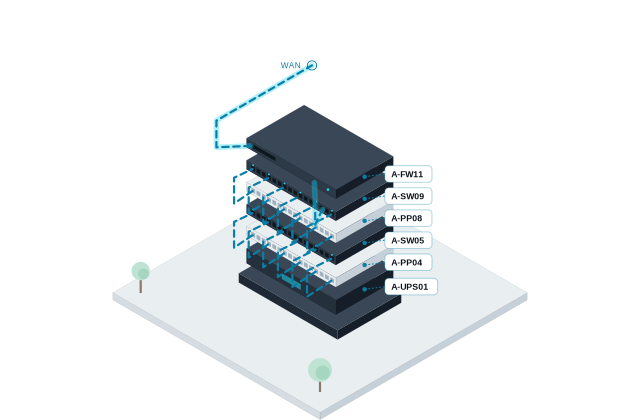
1. Decide the scheme before the label maker comes out
Write down one format and use it everywhere. A scheme that works well:
- Rack: a short code that is unique on the site, like
AorCR1-A - Device: rack code + type tag + the lowest RU it occupies, like
A-PP08for a patch panel in RU 8 orA-SW10for a switch - Port: device label + port number, like
A-PP08-12 - Wall outlet: built from the panel port it lands on, like
A08-12, so the plate tells you where to look
If your client’s specification or the standard you work to sets a format, use that instead — the point is one format, applied every time.
2. Label both ends, and the front of every device
Label each patch panel port and each wall plate jack with the same ID. Put the device label on the front of every unit where it can be read with the cabinet door open. Number RUs from the bottom unless the rack is marked otherwise, and keep to it.
3. Make labels that last
Use printed labels, not handwriting. Keep text short, high contrast and large enough to read with a torch. A QR code that opens the record means a technician can see what a port connects to without a spreadsheet.
4. Keep labels in step with the record
The most common failure is a label that was right once. In CABVIX, device and outlet IDs are generated from the rack and RU, and labels are printed from the record. If an ID changes after its label was printed, CABVIX lists the label as out of date so it can be reprinted.
STEP BY STEP
In short
- Agree the schemeRack, device, port, outlet.
- Document the rackSo the IDs exist before printing.
- Print the labelsFrom the record, not by hand.
- Check for stale labelsReprint anything that changed.
COMMON QUESTIONS
FAQs
Should RU numbering start at the top or the bottom?
Bottom-up is the most common, but either works if it is consistent and marked on the rack. CABVIX numbers bottom-up by default and can flip the display per rack.
What size stickers does CABVIX print?
Rack stickers fill the width of an A5 sheet, wall outlet stickers are 60 × 15 mm with one cell per jack, and equipment stickers are 18 × 18 mm squares, packed onto A5 sheets.
KEEP READING
Related
TRY IT
See it in the real app.
The live demo on our homepage is the real CABVIX app running in your browser on sample data. CABVIX is releasing soon: join the launch list to be first in.