CABVIX / Solutions / Cable tracing
CABLE TRACING
Trace an outlet to the switch
without opening the cabinet.
“Which switch port is desk 14 on?” Pick the outlet and CABVIX follows it hop by hop: wall outlet, patch panel port, patch lead, switch port — and on across cross-connects and links to other racks.
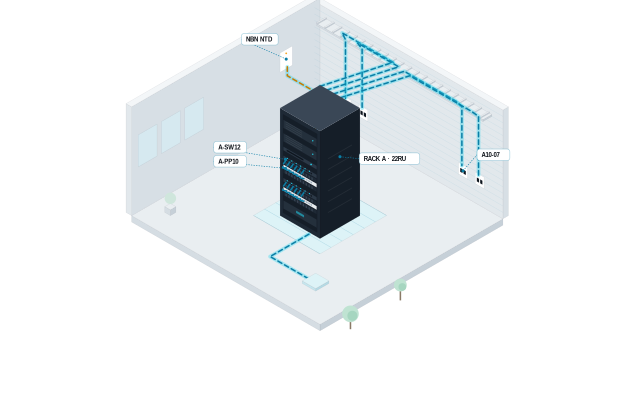
Hop by hop, from the record
Trace is built from the structured cabling, patching and network links you have recorded, so it answers instantly and works the same on a phone in the ceiling space as on a laptop in the office.
- Wall outlet → panel port → patch lead and colour → switch port
- Continues through cross-connects and across links to other racks
- Each hop names the device by its ID and location
See what an outage would take with it
Blast Radius uses the same record to simulate a failed switch, UPS, rack or carrier, and shows which outlets, devices and services would go down.PRO
Talk someone on site through it
Not on site? Guided fixes send a link with picture steps for one job — which rack, which unit, which port and which colour lead — so someone there can move a lead or tell you what the lights are doing.PRO
STEP BY STEP
How it works
- Open TraceFrom the rack’s Outlets tab or the Home quick action “Trace an outlet”.
- Pick the outletSearch by its ID or location.
- Read the pathEvery hop from the wall to the switch port.
COMMON QUESTIONS
FAQs
Does Trace test the cable?
No. CABVIX is a documentation tool: Trace follows the connections you have recorded. It is only as accurate as the record, which is why each rack shows its documentation health.
Can I scan a sticker to start?
Yes. Outlet stickers from Label Studio carry a QR code; scanning one with the CABVIX scan button opens Trace with that outlet picked.
KEEP READING
Related
TRY IT
See it in the real app.
The live demo on our homepage is the real CABVIX app running in your browser on sample data. CABVIX is releasing soon: join the launch list to be first in.